App Gratis
Developer: iMediapp
This app has quickly become my favorite. It presents you with a new, cool free app everyday. Unlike similar apps of it's kind, these apps are very good quality. From games to utilities, I look forward to seeing what freebies the new day will bring!
Click here to get the app
Saturday, March 16, 2013


Tuesday, November 27, 2012
5 Free Apps for Managing Documents
Read on for ways to send/ receive faxes, scan documents, sign documents and more from your iPhone and iPad.
1. Attachments.me for Gmail Email Account
Developer: attachments.me
This app gives a quick way to manage attachments from Gmail. All of the pictures, documents, videos, presentations and more received from Gmail are presented in a convenient list to save, download, forward and view. You can also set up automatic filters to organize attachments as you receive them . Syncs with Google Drive, Dropbox.
Click here to get the app
2. Faxburner
Developer: Networx Online, Inc.
This app is for Faxburner.com, an Internet-based faxing service. For free, you can receive faxes on your mobile device at a number given for 24 hour use. You must get a new number after that time in order to use the service for free. Fax up to 5 pages for free or choose a paid plan that will fit your needs.
Click here to get the app
3. PC-fax.com Communication Center
Developer:
Fax one page for free daily and buy optional credits to fax more pages if needed. You can fax from photo scan or opening the document using the app. It also syncs with Google Docs and Dropbox.
Click here to get the app
4. Sign Now- Sign and Fill PDF Word Documents
Developer: SignNow
Open a document using this app to sign it. The signature comes out neat and handwritten looking, although you are using your touch screen to create it. You can also insert regular typed words for dates, notes, etc. There's an option to email the document out from within the app.
Click here to get the app
5. Scan Pages
Developer: Ricoh Innovations
Use your iPhone or iPad as a scanner to email documents. Simply take a photo and edit it to adjust the brightness. You can send the document to Dropbox, Evernote or Google Docs as well as regular email. It will be sent as a PDF.
Click here to get the app

1. Attachments.me for Gmail Email Account
Developer: attachments.me
This app gives a quick way to manage attachments from Gmail. All of the pictures, documents, videos, presentations and more received from Gmail are presented in a convenient list to save, download, forward and view. You can also set up automatic filters to organize attachments as you receive them . Syncs with Google Drive, Dropbox.
Click here to get the app
2. Faxburner
Developer: Networx Online, Inc.
This app is for Faxburner.com, an Internet-based faxing service. For free, you can receive faxes on your mobile device at a number given for 24 hour use. You must get a new number after that time in order to use the service for free. Fax up to 5 pages for free or choose a paid plan that will fit your needs.
Click here to get the app
3. PC-fax.com Communication Center
Developer:
Fax one page for free daily and buy optional credits to fax more pages if needed. You can fax from photo scan or opening the document using the app. It also syncs with Google Docs and Dropbox.
Click here to get the app
4. Sign Now- Sign and Fill PDF Word Documents
Developer: SignNow
Open a document using this app to sign it. The signature comes out neat and handwritten looking, although you are using your touch screen to create it. You can also insert regular typed words for dates, notes, etc. There's an option to email the document out from within the app.
Click here to get the app
5. Scan Pages
Developer: Ricoh Innovations
Use your iPhone or iPad as a scanner to email documents. Simply take a photo and edit it to adjust the brightness. You can send the document to Dropbox, Evernote or Google Docs as well as regular email. It will be sent as a PDF.
Click here to get the app
Monday, November 26, 2012
5 Alternatives to Maps App for iOS 6
For the most part, I enjoy the maps upgrade in iOS 6, although I was sad to see the end of Google's tied in search.
Without Google, it has happened to me a couple of times that I searched and drove to a place of business, only to find it is closed.
Here are some alternatives you can use to avoid problems and add more tools to your device's mapping ability.
1. Motion X GPS Drive
Developer: Motion X
99 cents
Long before Apple introduced voice turn-by turn directions, I began using this app. It's just about as functional as a Garmin or similar navigation system. There are lots of search options including Bing, Wikipedia, Facebook, contact list, gas stations, address book and more.
Your 99 cents will get you all the features except for Voice and automatic turn by turn. For a yearly subscription around $10 today, you'll get those too.
Click here to get the app
2. Google Search
Developer: Google, Inc.
Free
I have found that the 'voice' option provides a quick way to get directions, much like Siri. Say "Directions to 123 Apple St." and google will quickly find the directions for you. You will be directed to the Google maps web app.
Of course you can also search for the address for the business by searching by typing or voice and inputting the address into regular iOS maps.
Click here to get the app
3. Where
Developer: Where, Inc.
Free
A simple way to search for places of business. Once you find the place, tap "get directions" and you are given the option to open with iOS maps. Also, there's info about the business such as hours and phone number.
Click here to get the app
4. Bing
Developer: Microsoft Corporation
Free
Similar to the Google Search app, this app will allow you to search for a place of business using voice or typing. There are turn by turn directions presented inside the app.
Click here to get the app
5. Beat the Traffic
Developer: Triangle Software
Free
This app makes it possible to route out alternate paths to your destination. You can choose which major highway you would like to take which is useful for big accidents and other heavy traffic.
Click here to get the app

Without Google, it has happened to me a couple of times that I searched and drove to a place of business, only to find it is closed.
Here are some alternatives you can use to avoid problems and add more tools to your device's mapping ability.
1. Motion X GPS Drive
Developer: Motion X
99 cents
Long before Apple introduced voice turn-by turn directions, I began using this app. It's just about as functional as a Garmin or similar navigation system. There are lots of search options including Bing, Wikipedia, Facebook, contact list, gas stations, address book and more.
Your 99 cents will get you all the features except for Voice and automatic turn by turn. For a yearly subscription around $10 today, you'll get those too.
Click here to get the app
2. Google Search
Developer: Google, Inc.
Free
I have found that the 'voice' option provides a quick way to get directions, much like Siri. Say "Directions to 123 Apple St." and google will quickly find the directions for you. You will be directed to the Google maps web app.
Of course you can also search for the address for the business by searching by typing or voice and inputting the address into regular iOS maps.
Click here to get the app
3. Where
Developer: Where, Inc.
Free
A simple way to search for places of business. Once you find the place, tap "get directions" and you are given the option to open with iOS maps. Also, there's info about the business such as hours and phone number.
Click here to get the app
4. Bing
Developer: Microsoft Corporation
Free
Similar to the Google Search app, this app will allow you to search for a place of business using voice or typing. There are turn by turn directions presented inside the app.
Click here to get the app
5. Beat the Traffic
Developer: Triangle Software
Free
This app makes it possible to route out alternate paths to your destination. You can choose which major highway you would like to take which is useful for big accidents and other heavy traffic.
Click here to get the app

Saturday, November 24, 2012
5 Free Apps for Music Lovers
1. Shazam
Developer: Shazam Entertainment Ltd.
Find out what song is playing by recording a short sample. The app will identify the song and save a tag for you to get it later. For iPad and iPhone.
Click to get the app
2. Slacker
Developer: Slacker, Inc.
Slacker is an Internet radio service like Pandora, with a couple additional features in the app. Many songs can be played by searching for them and you can search by albums in addition to artists and songs. For iPad and iPhone.
Click here to get the app
3. Vevo
Developer: Vevo
Watch music videos on your mobile device. For iPad and iPhone.
Click here to get the app
4. iHeartRadio
Developer: Clear Channel Management Services, LP
Listen to radio stations from all around the U.S. nation on your mobile device. For iPad and iPhone
Click here to get the app
5. Grooveshark
This is a web app to access music from Grooveshark.com account. Grooveshark is a shared music service where you can find almost any song you would like to hear for free. Save your favorites to your free account and make playlists to have your music collection everywhere. (Keep in mind that you will use Internet while listening to the songs).
Click here to get the app

Developer: Shazam Entertainment Ltd.
Find out what song is playing by recording a short sample. The app will identify the song and save a tag for you to get it later. For iPad and iPhone.
Click to get the app
2. Slacker
Developer: Slacker, Inc.
Slacker is an Internet radio service like Pandora, with a couple additional features in the app. Many songs can be played by searching for them and you can search by albums in addition to artists and songs. For iPad and iPhone.
Click here to get the app
3. Vevo
Developer: Vevo
Watch music videos on your mobile device. For iPad and iPhone.
Click here to get the app
4. iHeartRadio
Developer: Clear Channel Management Services, LP
Listen to radio stations from all around the U.S. nation on your mobile device. For iPad and iPhone
Click here to get the app
5. Grooveshark
This is a web app to access music from Grooveshark.com account. Grooveshark is a shared music service where you can find almost any song you would like to hear for free. Save your favorites to your free account and make playlists to have your music collection everywhere. (Keep in mind that you will use Internet while listening to the songs).
Click here to get the app

Friday, November 23, 2012
3 Free (+1 paid) Utility Apps for iPhone
1. Appzilla 3: 150 in 1 Free
Developer: Fossil Software
This is the mother of all utility apps. It's nice to have many different utilities in one location. There are 150 apps included such as a flashlight, leveler, day countdown and many more. Plus, there are a couple of entertaining apps such as silly photo editors and games.
Click here to get the app
2. Dimmer
Free
Developer: newforestar co., limited
Here's a quick and simple way to adjust your screen brightness. Open the app and slide the "switch" up or down.
Click here to get the app
3. U.S. Holidays
Free
Developer: Joules Media B.V.
Add all U.S. Holidays to your iCal with one click. Simply open the app and tap "subscribe to all". You can also select certain holidays from the calendar.
Click here to get the app
4. Groups: SMS, mail and manage contacts
$4.99
Developer: Guided Ways Technologies, LTD
In order to make groups on Contacts for iPhone or iPad, you typically have to sync your device with your computer's contacts. It also makes contact management more sophisticated with customizable 'smart groups' that are sorted automatically. Lastly, you can send Group Emails/ Texts out from within the app in a quicker manner.
Click here to get the app

Developer: Fossil Software
This is the mother of all utility apps. It's nice to have many different utilities in one location. There are 150 apps included such as a flashlight, leveler, day countdown and many more. Plus, there are a couple of entertaining apps such as silly photo editors and games.
Click here to get the app
2. Dimmer
Free
Developer: newforestar co., limited
Here's a quick and simple way to adjust your screen brightness. Open the app and slide the "switch" up or down.
Click here to get the app
3. U.S. Holidays
Free
Developer: Joules Media B.V.
Add all U.S. Holidays to your iCal with one click. Simply open the app and tap "subscribe to all". You can also select certain holidays from the calendar.
Click here to get the app
4. Groups: SMS, mail and manage contacts
$4.99
Developer: Guided Ways Technologies, LTD
In order to make groups on Contacts for iPhone or iPad, you typically have to sync your device with your computer's contacts. It also makes contact management more sophisticated with customizable 'smart groups' that are sorted automatically. Lastly, you can send Group Emails/ Texts out from within the app in a quicker manner.
Click here to get the app

Wednesday, November 21, 2012
Get in the cloud!
There is no need to depend on a computer to back up your iPhone or iPad any longer. I personally use my iPad as my main computing tool and have all data completely backed up in the cloud.
Here's how:
Back up phone (contacts, calendar, settings)
Go to settings app
Choose iCloud
Turn on iCloud backup
Make sure you have wifi and check that the backup completes
Put music and pics in the cloud using apps
There are many options to do this. Here are 2 good free methods.
For liberating large music libraries from your computer, Google Music is your best free option. You can upload up to 20,000 songs from your computer for free.
Go to here to check it out the website from your desktop, which you will need to do in order to upload music.
There is a web app to access the music on your iPhone or iPad. Simply visit music.google.com from your mobile device browser.
Photobucket
Developer: photobucket.com
This free app allows you to view, upload and download pictures from your account.
For large picture libraries, Photobucket is your best free option. You can upload and store unlimited photos and 500 videos with a free account. Go here to check it out the website for your desktop.
Click here to get the app
Here's how:
Back up phone (contacts, calendar, settings)
Go to settings app
Choose iCloud
Turn on iCloud backup
Make sure you have wifi and check that the backup completes
Put music and pics in the cloud using apps
There are many options to do this. Here are 2 good free methods.
For liberating large music libraries from your computer, Google Music is your best free option. You can upload up to 20,000 songs from your computer for free.
Go to here to check it out the website from your desktop, which you will need to do in order to upload music.
There is a web app to access the music on your iPhone or iPad. Simply visit music.google.com from your mobile device browser.
Photobucket
Developer: photobucket.com
This free app allows you to view, upload and download pictures from your account.
For large picture libraries, Photobucket is your best free option. You can upload and store unlimited photos and 500 videos with a free account. Go here to check it out the website for your desktop.
Click here to get the app
Tuesday, November 20, 2012
3 Free Photo Editing Apps for iPhone/ iPad
1. Photoshop Express
Developer: Adobe
This is generally good for all photos. It includes basic photo editing features of cropping, adjusting brightness, contrast and color saturation. There's also many cool filters to use such as the 'vibrant' one that makes all of the colors pop.
Click here to get the app
2. More Beaute 2
Developer: more-thing Company Limited
This tool is great for face portraits, it makes everything look brighter and smoother in one easy step.
Click here to get the app
3. iRetouch Free
Developer: Nick Drabovich
This app will let you get into more detailed photo editing such as replacing parts of the photo, blurring, smudging, etc. of course, it's easier to use on a bigger screen of the iPad.
Click here to get the app

Developer: Adobe
This is generally good for all photos. It includes basic photo editing features of cropping, adjusting brightness, contrast and color saturation. There's also many cool filters to use such as the 'vibrant' one that makes all of the colors pop.
Click here to get the app
2. More Beaute 2
Developer: more-thing Company Limited
This tool is great for face portraits, it makes everything look brighter and smoother in one easy step.
Click here to get the app
3. iRetouch Free
Developer: Nick Drabovich
This app will let you get into more detailed photo editing such as replacing parts of the photo, blurring, smudging, etc. of course, it's easier to use on a bigger screen of the iPad.
Click here to get the app

Monday, November 19, 2012
Help for broken iPhone/ iPad buttons
If your phone is past its warranty window and you're still waiting for an upgrade, here are some tips. Read on for tips to work around faulty or totally broken buttons.
For broken lock/ power or volume buttons:
Enable Assistive Touch by following these selections...
>Settings
>General
>Accessiblity
>Assistive Touch
>Enable Assistive Touch
You now have a white circle always present on the screen. From there, tap 'device' and find virtual lock screen button and volume buttons.
(You can drag the white circle around on the screen. To turn phone off, hold down virtual lock screen button)
For a broken home button:
Enable Assistive touch by following instructions above. Use the virtual home button and tap twice for app-switching.
If your home button is completely dead you won't want to lock your phone with the lock button.
Plug the phone into a charger in order to get the screen on.
Use one of these free apps to "lock" your screen. These apps were all created to protect photos/ videos, however, you can use them as a lock by setting up the password and starting the app to lock your phone. Keep in mind that you need to disable auto-lock in settings and your battery will be drained faster than if the phone were normally locked.
I would suggest leaving your chosen app on your home screen. It's your preference to put media in them or not.
1) Photo Password Free
Developer: Revolutionary concepts
You can use one of these new, cool picture gesture passwords by drawing a design on a photo of your choice. It's harder for people to guess and the possibilities are endless. Upgrade for 99 cents if you don't want to be bothered with ads.
Click here to get the app
2) Dot Lock Secure Media Locker Lite
Developer: David Lane
You can have a dot lock like all of your awesome Android friends. There's quite a few different types passwords you can set up using this app. Also, you can enable the app to snap a photo of people who try to "break in" your phone. Upgrade to no ads for 99 cents.
Click here to get the app
3) Private Photo Vault
Developer: William Sidell
You can have something very close to the traditional apple lock by using this app. A nice 4 digit pin. Upgrade to pro for $2.99 but the ads aren't all that bothersome in the free version
Click here to get the app


For broken lock/ power or volume buttons:
Enable Assistive Touch by following these selections...
>Settings
>General
>Accessiblity
>Assistive Touch
>Enable Assistive Touch
You now have a white circle always present on the screen. From there, tap 'device' and find virtual lock screen button and volume buttons.
(You can drag the white circle around on the screen. To turn phone off, hold down virtual lock screen button)
For a broken home button:
Enable Assistive touch by following instructions above. Use the virtual home button and tap twice for app-switching.
If your home button is completely dead you won't want to lock your phone with the lock button.
Plug the phone into a charger in order to get the screen on.
Use one of these free apps to "lock" your screen. These apps were all created to protect photos/ videos, however, you can use them as a lock by setting up the password and starting the app to lock your phone. Keep in mind that you need to disable auto-lock in settings and your battery will be drained faster than if the phone were normally locked.
I would suggest leaving your chosen app on your home screen. It's your preference to put media in them or not.
1) Photo Password Free
Developer: Revolutionary concepts
You can use one of these new, cool picture gesture passwords by drawing a design on a photo of your choice. It's harder for people to guess and the possibilities are endless. Upgrade for 99 cents if you don't want to be bothered with ads.
Click here to get the app
2) Dot Lock Secure Media Locker Lite
Developer: David Lane
You can have a dot lock like all of your awesome Android friends. There's quite a few different types passwords you can set up using this app. Also, you can enable the app to snap a photo of people who try to "break in" your phone. Upgrade to no ads for 99 cents.
Click here to get the app
3) Private Photo Vault
Developer: William Sidell
You can have something very close to the traditional apple lock by using this app. A nice 4 digit pin. Upgrade to pro for $2.99 but the ads aren't all that bothersome in the free version
Click here to get the app


5 Free Apps for Holiday Shopping
1. Google Shopper
Developer: Google, Inc.
Find every item you want and know that it's in stock at the store before making your way out. There's a search option for local and online stores. You simply need a few keywords to search. It also gives you a price scanner in your pocket while in stores.
Click here to get the app
2. Cardstar
Developer: CardStar Publishing, LLC
Load up all of your rewards cards so that you don't have to go searching through your wallet when you need it. It is very convenient.
Click here to get the app
3. Mall Maps
Developer: V.B. and Smith
Here's a handy tool for viewing a map of your local mall (US only). You can see all the stores by level and it will hopefully get you out of the madness a little sooner.
Click here to get the app
4. Shopkick
Developer: shopkick
Get rewards for simply being inside (or near stores) when you check-in on the app. The points are earned towards gift cards of your choice.
Click here to get the app
5. Black Friday Survival Guide
Developer: Sazze, Inc.
You can view all of the deals organized by store and by category, as well as create a shipping list within the app.
Click here to get the app

Developer: Google, Inc.
Find every item you want and know that it's in stock at the store before making your way out. There's a search option for local and online stores. You simply need a few keywords to search. It also gives you a price scanner in your pocket while in stores.
Click here to get the app
2. Cardstar
Developer: CardStar Publishing, LLC
Load up all of your rewards cards so that you don't have to go searching through your wallet when you need it. It is very convenient.
Click here to get the app
3. Mall Maps
Developer: V.B. and Smith
Here's a handy tool for viewing a map of your local mall (US only). You can see all the stores by level and it will hopefully get you out of the madness a little sooner.
Click here to get the app
4. Shopkick
Developer: shopkick
Get rewards for simply being inside (or near stores) when you check-in on the app. The points are earned towards gift cards of your choice.
Click here to get the app
5. Black Friday Survival Guide
Developer: Sazze, Inc.
You can view all of the deals organized by store and by category, as well as create a shipping list within the app.
Click here to get the app

Friday, November 16, 2012
4 Free Essential iPhone Apps
Virtually everyone has a use for these apps and they should definitely be on your iPhone.
1. Chrome
Developer: Google, Inc.
Google account users will enjoy this alternative to Safari. Surf the web, access easy in-app settings, and save bookmarks to your Google account.
Click here to get the app
2. Fandango
Developer: Fandango
Look up movie times, find local theaters and get directions/ phone number, watch previews, see critic rating and buy tickets.
Click here to get the app
3. Yelp
Developer: Yelp
Find local reviews on any sort of business you need, from tattoo shops to dentists to restaurants, there is probably a review for it here. You can also find business hours, address, phone number and directions. It's a good way to discover new things and get more information before making your way to the place.
Click here to get the app
4. Flashlight
Developer: iHandy, Inc.
The app does exactly what it sounds like, puts a flashlight on your phone using the iPhone camera flash. It's helpful in emergencies, leave it on your home page or dock for easy access.
Click here to get the app

1. Chrome
Developer: Google, Inc.
Google account users will enjoy this alternative to Safari. Surf the web, access easy in-app settings, and save bookmarks to your Google account.
Click here to get the app
2. Fandango
Developer: Fandango
Look up movie times, find local theaters and get directions/ phone number, watch previews, see critic rating and buy tickets.
Click here to get the app
3. Yelp
Developer: Yelp
Find local reviews on any sort of business you need, from tattoo shops to dentists to restaurants, there is probably a review for it here. You can also find business hours, address, phone number and directions. It's a good way to discover new things and get more information before making your way to the place.
Click here to get the app
4. Flashlight
Developer: iHandy, Inc.
The app does exactly what it sounds like, puts a flashlight on your phone using the iPhone camera flash. It's helpful in emergencies, leave it on your home page or dock for easy access.
Click here to get the app

11 Free Puzzle Games
I got the idea for this post from a friend who enjoys games of a puzzling nature. They are great for occupying your mind with a pleasant distraction.
1. Save the Pencil Lite
Developer: Perfect Dimension
Draw your way to safety and collect as many stars as you can along the way. It's fun and provides enough challenge to be stimulating.
Click here to get the app
2. Bag It! Lite
Developer: Hidden Variable Studios
Bag the cute, animated groceries in a way that will preserve their fragile condition. This game is fun for all ages.
Click here to get the app
3. Zentomino Lite
Developer: Little White Bear Studios, LLC
This game is a little more difficult and time consuming to master. It's like those puzzles with many little pieces that take a long time to complete (but not as bad).
Click here to get the ap
4. MazeFinger Plus
Developer: ngmoco, LLC
A quick and easy game to learn. It adds the exciting element of speed to the traditional draw your way out of the maze activity.
Click here to get the app
5. Cut the Rope Free
Developer: Chillingo Ltd
If you have a penchant for physics, this could be the game for you. I am not partial to it myself and I play it to get a better grip on the physical laws of the universe. Cut the ropes to feed the small, cute monster candy.
Click here to get the app
6. Sudoku 2
Developer: Finger Arts
This classic game is a must for true puzzle fans. I'm sure it's exercising some mental ability. See if you can finish without giving up!
Click here to get the app
7. Snappers
Developer: Emerging Banking LLC
This is an original game where you "snap" little creatures into many pieces, clearing out other creatures in the pathway of the debris. It involves planning and spatial reasoning.
Click here to get the app
8. Move It!
Developer: Optime Software LLC
I enjoy this game a little more than its similar app, Unlock Me, because you are able to move the pieces any where there is space as opposed to one plane. It's also a little more colorful. But you are basically trying to move a certain piece to the "exit"
Click here to get the app
9. Cross Fingers Free
Developer: Mobigame
The zen like design of this game makes it more relaxing than other puzzle games. You are moving multiple pieces together to make a particular shape.
Click here to get the app
10. Zookeeper
Developer: Kiteretsu, Inc.
Don't be overwhelmed by the jam-packed visuals, give the directions a double look and you'll see the concept is easy. Rearrange animals to make rows of three or more. They are pretty cute too, in that Lego sort of way.
Click here to get the app
11. The Moron Test Section 1
Developer: Distinct Dev, Inc.
If you're feeling the need to humble yourself, try and fly through this "moron test". It is pretty entertaining and more tricky than your average puzzle.
Click here to get the app

1. Save the Pencil Lite
Developer: Perfect Dimension
Draw your way to safety and collect as many stars as you can along the way. It's fun and provides enough challenge to be stimulating.
Click here to get the app
2. Bag It! Lite
Developer: Hidden Variable Studios
Bag the cute, animated groceries in a way that will preserve their fragile condition. This game is fun for all ages.
Click here to get the app
3. Zentomino Lite
Developer: Little White Bear Studios, LLC
This game is a little more difficult and time consuming to master. It's like those puzzles with many little pieces that take a long time to complete (but not as bad).
Click here to get the ap
4. MazeFinger Plus
Developer: ngmoco, LLC
A quick and easy game to learn. It adds the exciting element of speed to the traditional draw your way out of the maze activity.
Click here to get the app
5. Cut the Rope Free
Developer: Chillingo Ltd
If you have a penchant for physics, this could be the game for you. I am not partial to it myself and I play it to get a better grip on the physical laws of the universe. Cut the ropes to feed the small, cute monster candy.
Click here to get the app
6. Sudoku 2
Developer: Finger Arts
This classic game is a must for true puzzle fans. I'm sure it's exercising some mental ability. See if you can finish without giving up!
Click here to get the app
7. Snappers
Developer: Emerging Banking LLC
This is an original game where you "snap" little creatures into many pieces, clearing out other creatures in the pathway of the debris. It involves planning and spatial reasoning.
Click here to get the app
8. Move It!
Developer: Optime Software LLC
I enjoy this game a little more than its similar app, Unlock Me, because you are able to move the pieces any where there is space as opposed to one plane. It's also a little more colorful. But you are basically trying to move a certain piece to the "exit"
Click here to get the app
9. Cross Fingers Free
Developer: Mobigame
The zen like design of this game makes it more relaxing than other puzzle games. You are moving multiple pieces together to make a particular shape.
Click here to get the app
10. Zookeeper
Developer: Kiteretsu, Inc.
Don't be overwhelmed by the jam-packed visuals, give the directions a double look and you'll see the concept is easy. Rearrange animals to make rows of three or more. They are pretty cute too, in that Lego sort of way.
Click here to get the app
11. The Moron Test Section 1
Developer: Distinct Dev, Inc.
If you're feeling the need to humble yourself, try and fly through this "moron test". It is pretty entertaining and more tricky than your average puzzle.
Click here to get the app
3 Apps to Expand Your Mobile Storage
The limited storage capacity on iPhone and iPad need not hold you back from having all the documents, PDFs, images and videos available on your device.
Here are 3 of my favorite free options to access those items without jamming up your memory. Take your pick!
1. Google Drive
Developer: Google, Inc.
Get this app if you are looking to work with documents.
If you are already using Google in your life as much as I am, it makes sense to go with this option. You can store docs, pics, videos and google docs that were created online from this app. It syncs with your Google account. There's a desktop program for easy syncing and you start off with 5GB free.
Click here to get the app
2. Dropbox
Developer: Dropbox
Get this app of you are want easy photo uploading along with storage for documents.
When you sign up, you get 2GB of storage. You can increase this storage by purchasing more or referring friends to sign up. Also, if you allow automatic camera roll uploads, you get additional free storage.
This free app syncs with Dropbox.com. There is also a desktop application to keep you synced on that end. You can upload or download pics, videos, docs, etc from any of those access points.
Click here to get the app
3. Skydrive
Developer: Microsoft Corporation
Get this app if you simply want a lot of free storage.
Microsoft and Windows Live fans may appreciate this app more. It syncs with your Windows live account on skydrive.com. You can save and access pics, videos, and docs.
Big bonus for this app is the most free storage capacity at 7GB to start.
Click here to get the app
*Tip: How to upload*
For all 3 of these apps, there are 2 methods to upload from your iphone or camera.
1) From within the app:
Find the upload option and select items from the camera roll (only pics or vids)
2) From within another application such as email, Pages, etc:
Find the item and select "open with" option... from there you can choose the app you want the file to save to such as Google Drive or Dropbox.

Here are 3 of my favorite free options to access those items without jamming up your memory. Take your pick!
1. Google Drive
Developer: Google, Inc.
Get this app if you are looking to work with documents.
If you are already using Google in your life as much as I am, it makes sense to go with this option. You can store docs, pics, videos and google docs that were created online from this app. It syncs with your Google account. There's a desktop program for easy syncing and you start off with 5GB free.
Click here to get the app
2. Dropbox
Developer: Dropbox
Get this app of you are want easy photo uploading along with storage for documents.
When you sign up, you get 2GB of storage. You can increase this storage by purchasing more or referring friends to sign up. Also, if you allow automatic camera roll uploads, you get additional free storage.
This free app syncs with Dropbox.com. There is also a desktop application to keep you synced on that end. You can upload or download pics, videos, docs, etc from any of those access points.
Click here to get the app
3. Skydrive
Developer: Microsoft Corporation
Get this app if you simply want a lot of free storage.
Microsoft and Windows Live fans may appreciate this app more. It syncs with your Windows live account on skydrive.com. You can save and access pics, videos, and docs.
Big bonus for this app is the most free storage capacity at 7GB to start.
Click here to get the app
*Tip: How to upload*
For all 3 of these apps, there are 2 methods to upload from your iphone or camera.
1) From within the app:
Find the upload option and select items from the camera roll (only pics or vids)
2) From within another application such as email, Pages, etc:
Find the item and select "open with" option... from there you can choose the app you want the file to save to such as Google Drive or Dropbox.

Thursday, November 15, 2012
3 Must-have Free Flight Apps & More
If you're taking any flights in the near future, which you might be for the holiday season, put these on your phone!
1. Flysmart
Developer: Sapient
This app will give you all of the information you need about the airport you are in or need to get to such as nearby restaurants, transportation information, weather, and a map of the airport.
Click here to get the app
2. Tripcase
Developer: Sabre Inc.
With an easy set-up and the input of your ticket information beforehand, you will always have the updated info for you flight in the palm of your hand, including those pesky last minute gate-changes and flight delays.
Click here to get the app
3. Kayak
Developer: kayak.com
Most people know about this website to search for the cheapest possible flight. Don't forget they have an app and it can also be used for hotels. Of course, double check for your flight on the particular airline website itself where special deals may apply.
Click here to get the app
Last off, all major airlines have an app nowadays that can be used to check in, request a change in flight etc. so stock your phone or tablet with that too.
Don't forget to check the post on games you can play while in flight (don't need Internet) here and some more classics here.

1. Flysmart
Developer: Sapient
This app will give you all of the information you need about the airport you are in or need to get to such as nearby restaurants, transportation information, weather, and a map of the airport.
Click here to get the app
2. Tripcase
Developer: Sabre Inc.
With an easy set-up and the input of your ticket information beforehand, you will always have the updated info for you flight in the palm of your hand, including those pesky last minute gate-changes and flight delays.
Click here to get the app
3. Kayak
Developer: kayak.com
Most people know about this website to search for the cheapest possible flight. Don't forget they have an app and it can also be used for hotels. Of course, double check for your flight on the particular airline website itself where special deals may apply.
Click here to get the app
Last off, all major airlines have an app nowadays that can be used to check in, request a change in flight etc. so stock your phone or tablet with that too.
Don't forget to check the post on games you can play while in flight (don't need Internet) here and some more classics here.

Tuesday, November 13, 2012
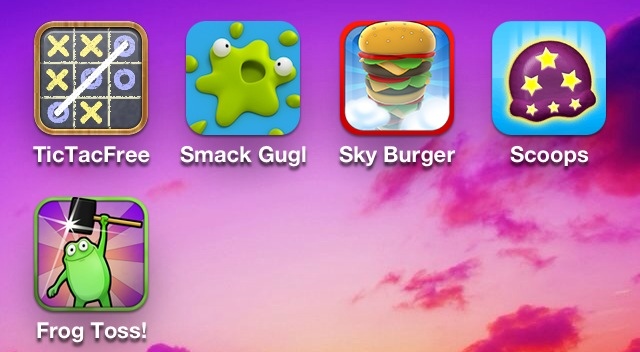
4 Free (+1 Cheap) Games for Young Kids
These apps are good for a parent looking to keeping a young child entertained. If you happen to like them yourself, all the better.
1. Tic Tac Toe Free
Developer: Optime Software, LLC
One or two player options here. This game just seems to make the time fly by fast.
Click here to get the app
2. Smack That Gugl- .99 cents
Developer: Tayasui.com
Interesting game here with bright cheery graphics. Children will like the Nickelodeon feel of this app. The object of the game is to prevent the little creatures from exploding into a gooey mess but kids might do the opposite!
Click here to get the app
3. Sky Burger- Free
Developer: Nimblebit, LLC
A balancing game where you try you stack your burger as high as possible. Warning: Don't let your kid play this when he's hungry.
Click here to get the app
4. Scoops- Free
Developer: Nimblebit Circus, LLC
A balancing game where you try to stack your ice cream come as high as possible. Warning: Again, this app may cause your child to ask for ice cream.
Click here to get the app
5. Frog Toss- Free
Developer: Game Circus, LLC
This is a carnival like game with a little direction to make it easier for young kids. You don't really have to aim, but you do have to time the launches to end up with frogs on the Lilly pads.
Click here to get the app

1. Tic Tac Toe Free
Developer: Optime Software, LLC
One or two player options here. This game just seems to make the time fly by fast.
Click here to get the app
2. Smack That Gugl- .99 cents
Developer: Tayasui.com
Interesting game here with bright cheery graphics. Children will like the Nickelodeon feel of this app. The object of the game is to prevent the little creatures from exploding into a gooey mess but kids might do the opposite!
Click here to get the app
3. Sky Burger- Free
Developer: Nimblebit, LLC
A balancing game where you try you stack your burger as high as possible. Warning: Don't let your kid play this when he's hungry.
Click here to get the app
4. Scoops- Free
Developer: Nimblebit Circus, LLC
A balancing game where you try to stack your ice cream come as high as possible. Warning: Again, this app may cause your child to ask for ice cream.
Click here to get the app
5. Frog Toss- Free
Developer: Game Circus, LLC
This is a carnival like game with a little direction to make it easier for young kids. You don't really have to aim, but you do have to time the launches to end up with frogs on the Lilly pads.
Click here to get the app
Monday, November 12, 2012
12 Free 90s Childhood Games
Give yourself some nostalgia with these classics from your childhood (if you fall into the 20 or 30 something range). These games are a blast from the past and are sure to give you a break from the new millennium.
1. Minesweeper Classic Free
Developer: Liberty For One
Who can resist the gratuitous anxiety caused by this the thrilling computer game Minesweeper. When I first played this, I thought a smiley face has never looked so sinister.
Click here to get the app
2. Pac-man Lite
Developer: Namco Networks, America Inc. Games
Despite the inherent problems of making a joystick game, 3D, you can still get a satisfying PacMan experience from this game. Full version is $2.99 if you don't tire of the game after 2 levels. You can also do some hunting around for the Mrs. Pac-Man game in the App Store if she rocks your socks a little bit better.
Click here to get the app
3. Memory Block
Developer: Category 5 Games
This game is similar to Simon, the classic game that required you to memorize a pattern of colors and touch the buttons in the same order as it was played.
Click here to get the app
4. 20Q Mind Reader Free
Developer: Digital Chocolate, Inc.
Prepare to be amazed! Think of an object... Any kid-friendly object and the amazing 20Q app will read your mind with the help of 20 questions or less. It is pretty impressive.
Click here to get the app
5. Mancala FS5
Developer: FlipSide5, Inc.
I remember playing with this board game back in elementary school. Of course it's better with shiny gems but this is still a fun game.
Click here to get the app
6. Four in a Row Free
Developer: Optime Software LLC
This is similar to Connect 4. Be the first to get 4 in a row and win! You can choose to play against the computer or a friend.
Click here to get the app
7. Action Bowling Free
Developer: Kronos Games
Here we have a traditional game of bowling without the need for the shoe rental. Maybe I can finally get a triple digit score with enough practice here.
Click here to get the app
8. Ping Pong- Insanely Addictive
Developer: Miniclip.com
If you prefer a more action-oriented game, this is one that might get you moving. Try to bounce the ping pong ball on your paddle. It is harder than it looks.
Click here to get the app
9. Solitaire
Developer: MobilityWare
If you spent hours playing Minesweeper, then you probably had your fair share of computer solitaire, too. After all of these years, it has not lost its appeal.
Click here to get the app
10. Touch Hockey: FS5
Developer: FlipSide5, Inc.
Go in for the kill shot in this classically designed table hockey game, down to the scores on the side. Do a cool enough shot and you can revel in the instant replay.
Click here to get the app
11. Glow Hockey 2 Free
Developer: Natenai Ariyatrakool
Because everything was cooler when it glowed in the 90s, I have included glow hockey, as the funkier counterpart to the traditional version. It also includes a 2-player option and nifty sound effects.
Click here to get the app
12. Wooden Labyrinth 3D Free
Developer: Elias Pietil
The most frustrating game for a child makes a digital comeback. See if you can manage a little better now that you are older and wiser. Get the ever elusive tiny metal ball from start to finish if you can!
Click here to get the app

1. Minesweeper Classic Free
Developer: Liberty For One
Who can resist the gratuitous anxiety caused by this the thrilling computer game Minesweeper. When I first played this, I thought a smiley face has never looked so sinister.
Click here to get the app
2. Pac-man Lite
Developer: Namco Networks, America Inc. Games
Despite the inherent problems of making a joystick game, 3D, you can still get a satisfying PacMan experience from this game. Full version is $2.99 if you don't tire of the game after 2 levels. You can also do some hunting around for the Mrs. Pac-Man game in the App Store if she rocks your socks a little bit better.
Click here to get the app
3. Memory Block
Developer: Category 5 Games
This game is similar to Simon, the classic game that required you to memorize a pattern of colors and touch the buttons in the same order as it was played.
Click here to get the app
4. 20Q Mind Reader Free
Developer: Digital Chocolate, Inc.
Prepare to be amazed! Think of an object... Any kid-friendly object and the amazing 20Q app will read your mind with the help of 20 questions or less. It is pretty impressive.
Click here to get the app
5. Mancala FS5
Developer: FlipSide5, Inc.
I remember playing with this board game back in elementary school. Of course it's better with shiny gems but this is still a fun game.
Click here to get the app
6. Four in a Row Free
Developer: Optime Software LLC
This is similar to Connect 4. Be the first to get 4 in a row and win! You can choose to play against the computer or a friend.
Click here to get the app
7. Action Bowling Free
Developer: Kronos Games
Here we have a traditional game of bowling without the need for the shoe rental. Maybe I can finally get a triple digit score with enough practice here.
Click here to get the app
8. Ping Pong- Insanely Addictive
Developer: Miniclip.com
If you prefer a more action-oriented game, this is one that might get you moving. Try to bounce the ping pong ball on your paddle. It is harder than it looks.
Click here to get the app
9. Solitaire
Developer: MobilityWare
If you spent hours playing Minesweeper, then you probably had your fair share of computer solitaire, too. After all of these years, it has not lost its appeal.
Click here to get the app
10. Touch Hockey: FS5
Developer: FlipSide5, Inc.
Go in for the kill shot in this classically designed table hockey game, down to the scores on the side. Do a cool enough shot and you can revel in the instant replay.
Click here to get the app
11. Glow Hockey 2 Free
Developer: Natenai Ariyatrakool
Because everything was cooler when it glowed in the 90s, I have included glow hockey, as the funkier counterpart to the traditional version. It also includes a 2-player option and nifty sound effects.
Click here to get the app
12. Wooden Labyrinth 3D Free
Developer: Elias Pietil
The most frustrating game for a child makes a digital comeback. See if you can manage a little better now that you are older and wiser. Get the ever elusive tiny metal ball from start to finish if you can!
Click here to get the app

Friday, November 9, 2012
10 Fun Free Games (No Internet Needed)
Before your next flight or other web-less situation, be sure to stock up on some games to keep you entertained. Here are some of my favorites.
Indiana-Jonesesque adventure guy makes his way through the a maze careful not to let the pack of wild animals behind him catch up. This is a simple game to learn and easy way to pass the time.
Click here to get the app
8. Subway Surf
Developer: Kiloo
Similar to Temple Run in the whole running through an obstacle course thing, but in this game you are a young boy running through a train station, you can also use a skateboard. And the animal behind you is an angry security guard.
Click here to get the app
9. Amateur Surgeon Lite
Developer: [adult swim]
I had to include this game because it is SO entertaining. You are the crazy surgeon operating on very interesting characters. The gameplay is consuming. Warning: you will probably want to get the full version like I did and its worth it!
Click here to get the app
10. NYTimes Crosswords
Developer: Magmic, Inc.
Keeping with the plane theme, crosswords are where it is at! Give your brain a break from the mindless games and try out some crosswords made by NYtimes.
Click here to get the app
11. A Quest of Knights On Rush
Developer: Chillingo LTD
You are the pint-sized knight fighting evil wizards and other medieval attacks with your mighty sword. See how far you can get before your life force drops to zero.
Click here to get the app
1. Jelly Car 2
Developer: Disney
Navigate your jelly car through a whimsical papery world. Bright colors and silly animations are amusing. It is pretty funny when your car gets mashed up in a cog-wheel.
2. Mega Jump
Developer: Get Set Games
Easy to learn and easily addicting! Try and reach uncharted heights with your creature, eating coins to stay in the air. You are rewarded for playing in game coins, which can be used to buy extra power-ups. This is a nice feature when many games try to make you pay REAL DOLLARS for game add-ons.
3. Mega Run
Developer: Get Set Games
Although the name sounds similar, this game feels unique from Mega Jump. It reminds me of old-school Mario video games. Your creature runs through a fun world, avoiding obstacles and collecting coins and extras for points.
4. Tap Defense
Developer: TapJoy
A strategic game in a medieval setting. Protect your castle from evil invaders with an artillery of purchasable weapons. It starts out very easy but soon becomes challenging. The more you play, the more riches you will obtain.
5. Traffic Rush
Developer: Donut Games
My sister first introduced this game to me. I quickly became a fan after playing a couple of rounds. It is harder than it seems to direct traffic and prevent accidents from happening between cars, semi-trucks and motorcycles. Give it a try!
6. Flight Control
Developer: Firemint Pty Ltd
Similar concept to Traffic Rush but it is even better for a plane ride. You are the pilot bringing planes to land safely on the runway. Be careful not to let multiple planes collide.
*correction: this game cost 99 cents (so check out #11 for the 10th freebie)
7. Temple Run
Developer: Imangi Studios, LLC
Indiana-Jonesesque adventure guy makes his way through the a maze careful not to let the pack of wild animals behind him catch up. This is a simple game to learn and easy way to pass the time.
Click here to get the app
8. Subway Surf
Developer: Kiloo
Similar to Temple Run in the whole running through an obstacle course thing, but in this game you are a young boy running through a train station, you can also use a skateboard. And the animal behind you is an angry security guard.
Click here to get the app
9. Amateur Surgeon Lite
Developer: [adult swim]
I had to include this game because it is SO entertaining. You are the crazy surgeon operating on very interesting characters. The gameplay is consuming. Warning: you will probably want to get the full version like I did and its worth it!
Click here to get the app
10. NYTimes Crosswords
Developer: Magmic, Inc.
Keeping with the plane theme, crosswords are where it is at! Give your brain a break from the mindless games and try out some crosswords made by NYtimes.
Click here to get the app
11. A Quest of Knights On Rush
Developer: Chillingo LTD
You are the pint-sized knight fighting evil wizards and other medieval attacks with your mighty sword. See how far you can get before your life force drops to zero.
Click here to get the app

Wednesday, November 7, 2012
3 Free Apps for a Healthier You!
You want to get a head start on New Year's fitness goals and don't have personal trainer money. Here are some apps that can make a difference in your health without hurting your wallet.
1. LoseIt!
Developer: FitNow
If you're looking to shed a few pounds, maintain your physique or want some guidance toward a healthier lifestyle, this app is the answer. Since the key to losing weight is burning more calories than you take in, there's no way to fail if you stick to the plan. The app allows you to set a goal date, ideal weight and track daily meals and activities to keep you on target. Most activities are listed in the database with estimated calories burned with each one. Available on iPhone and iPad.
Click here to get the app
2. Heart Rate Monitor
Developer: Azumia, Inc.
If you're interested in tracking your heart rate for medical reasons or just wondering what your normal levels are, this is the app for you. During cardiovascular exercise, you want to keep your heart rate above a certain level so it's also great for that. Simply place your finger on the camera lens for a reading in a few seconds. The paid version adds the feature of tracking your levels over time but the free version is still useful.
Side note: You must have an iPhone 4 or later for this app as it requires a flash.
Click here to get the app
3. Yoga Free
Developer: Arawella Corporation
Yoga is an amazing exercise option for nearly everyone. Get into practice. With this free app that allows you to customize a routine and track the days you have completed yoga exercise. There are poses for the beginner to the guru. Audio and visual guidance makes starting out a breeze. Get moving! Available on iPhone and iPad.
Click here to get the app

1. LoseIt!
Developer: FitNow
If you're looking to shed a few pounds, maintain your physique or want some guidance toward a healthier lifestyle, this app is the answer. Since the key to losing weight is burning more calories than you take in, there's no way to fail if you stick to the plan. The app allows you to set a goal date, ideal weight and track daily meals and activities to keep you on target. Most activities are listed in the database with estimated calories burned with each one. Available on iPhone and iPad.
Click here to get the app
2. Heart Rate Monitor
Developer: Azumia, Inc.
If you're interested in tracking your heart rate for medical reasons or just wondering what your normal levels are, this is the app for you. During cardiovascular exercise, you want to keep your heart rate above a certain level so it's also great for that. Simply place your finger on the camera lens for a reading in a few seconds. The paid version adds the feature of tracking your levels over time but the free version is still useful.
Side note: You must have an iPhone 4 or later for this app as it requires a flash.
Click here to get the app
3. Yoga Free
Developer: Arawella Corporation
Yoga is an amazing exercise option for nearly everyone. Get into practice. With this free app that allows you to customize a routine and track the days you have completed yoga exercise. There are poses for the beginner to the guru. Audio and visual guidance makes starting out a breeze. Get moving! Available on iPhone and iPad.
Click here to get the app
Sunday, November 4, 2012
10 Favorite Free Apps You May Not Have
From falling asleep faster, to effortless music listening, to saving money, there's the perfect app for all of your needs.
1) IM+
Developer: Shape Gmbh
Developer: Shape Gmbh
Google Talk, Facebook, and other less well-known chatting tools can be accessed here. Fun features of changing the background and message tones make this app even better. You can designate a certain length of time to stay connected to the service, see when friends are typing in your chat and sync settings between all apple devices using iCloud.
Click here to get the app
2) Gasbuddy
Developer: Gasbuddy Organization, Inc.
Developer: Gasbuddy Organization, Inc.
Perhaps you have heard of the website, but did you know there was an app? The simple interface makes finding the cheapest gas to fill up on the fly a simple task!
Click here to get the app
Click here to get the app
3) Accuweather
Developer: Accuweather, Inc.
Developer: Accuweather, Inc.
Also, website-derived.... the clean app brings more detail and illustration to weather forecasting than the pre-installed weather app. You can view maps and video for those who would like that sort of information. My favorite detail is the humidity percentage and real-feel, which truly make a difference when it comes to choosing appropriate clothing and hair-styles.
4) NPR
Developer: NPR
Developer: NPR
Even if you can't stand to sit through hours of news every day, there's an app to keep you generally informed of issues and events all around the globe. With the hourly newscast, you'll get to hear the highlights in right around 5 minutes. when you find an extra minute, there are stories available to listen to or read right at your finger-tips. You can make a playlist of stories to listen to at work or on a long drive or tune into your local NPR station with ease.
5) Mint
Developer: Mint.com
Developer: Mint.com
This is an app that could change your life! It makes budgeting fun. If you use plastic more than cash, it is such a breeze to see exactly where your money is going, by tracking all transactions and categorizing them. You can set budgets, make goals and view your progress. You can add all credit cards, loan and bank accounts to get a clear view of your debts and assets. This app is a companion for mint.com which is awesome. By syncing between iPad, iPhone and website, you can always account for every cent!
6) Vocabology
Developer: Thatwith.me, LLC
Everyone can use a little self-improvement. In the days of texting, emoticons, acronyms and broken-qdown language, let us all remember the wide world of words that still exist. You'll get a new word each day from the dictionary you choose. This is helpful for expanding vocabulary in a new language, too!
7) Songza
Developer: Songza Media, Inc.
You want to listen to music but not sure what you want to hear? This "music concierge" could be a great fix! Just open up the app for suggestions based on the time, day, and activity. With a sleep timer, clock view, and optional facebook sharing, you will wonder how this app is still free!
8) Urbanspoon
Developer: Urbanspoon
Developer: Urbanspoon
Ok, so maybe you do have this already... but it has to be on the list because it is great. No matter if you are in your home-town or a brand new city, you can find eats to fit your taste and budget. There is a random selection tool if you are in the mood to experiment. Included are reviews, prices, and hours that the restaurant is open, and a menu if you're lucky.
9) iDream
Developer: George Talusan
Developer: George Talusan
Looking for a gadget that will help you sleep better but don't feel like paying for a new fancy machine? You can simply put this free app on your iPhone or iPad for a quick fix. There are different themes included such as white noise, pink noise, ocean, rain, etc. It has done the trick for me more than once for me and just might do the same for you.
10) Crackle
Developer: Crackle, Inc.
Developer: Crackle, Inc.
Free movies and shows that are updated every month or so. The selection ranges from classics to relatively new in all genres. As always, you can't beat free.
Click to get the app
Click to get the app

Saturday, October 13, 2012
3 Apps for Getting Free Music & Movies (no jailbreaking needed)
Free Music Downloader Pro- $.99
Developer: Apps2Be
(Update 11/16: this app was removed from the store, hopefully it will come back. An alternative app without iPhone library integration option can be found here.)
Download music directly to your iPhone and iPad (without the pretty penny that iTunes will charge for this capability). Now you can satisfy your most random urges for songs to listen to while stuck in traffic, always have the song your bestie requests while pre-partying and snag the latest radio hit before heading home sans computer syncing.
The most awesome feature of this app is integration with your stock music library. There is no need to switch between the Music app and this one in order to hear the songs you already have and those you just downloaded. They can all be found sweetly coexisting in this app under the songs section.
Use the built-in browser to google search on free download sites and bookmark for future use. Other unique and cool features for this app are the options to preview a song before downloading so there are no surprises and listen to it while it is downloading if your patience is as short as mine.
The free version will allow for adequate test driving with a limited number of downloads.
Click here to download the app
Azul Media Player- $1.99
Developer: Gplex
Download videos directly to your iPhone and iPad. Play more types of videos than the native device player allows.
I mostly use this app to download video taped college lectures and play them in double-speed for those professors that forgot their espresso before class or in half-speed for those who mercilessly whip through 5 book chapters in 30 minutes.
Video playback speed options are .5, 1, 1.5 and 2x the normal rate. Use the built-in browser to find a website containing your video or open from email/ text.
Click here to download the app
Skyfire Web Browser- $2.99
Developer: Skyfire Labs, Inc.
Play videos that require flash. This is the best workaround to the no Adobe flash on apple mobile devices that I have come across, though there are limitations.
Use the built-in browser to navigate to the website containing the desired video and wait while the app magically transforms the flash video into something playable on your device.
The downside is that you are not able to rewind or fast forward the video, as it is essentially being streamed to your device, but hey it's better than nothing. This app will only work for websites that have been processed by the Skyfire servers, however this is a decent amount of videos.

Subscribe to:
Posts (Atom)